Convert MKV to iPhone Photos
MKV containers stall when imported into Apple Photos or iCloud. Orchard repackages the H.264/HEVC stream into native MP4 in seconds, converting non-standard audio to AAC.
Fast Lossless RemuxFix "Unsupported Format", black screen, or missing sound on Apple gear. Orchard Converter turns MKV, AVI, WMV, WebM, and camcorder recordings into native Apple-ready MP4, M4V, and AAC. Seamless playback in Photos, QuickTime, Apple TV, Files, and AirDrop.


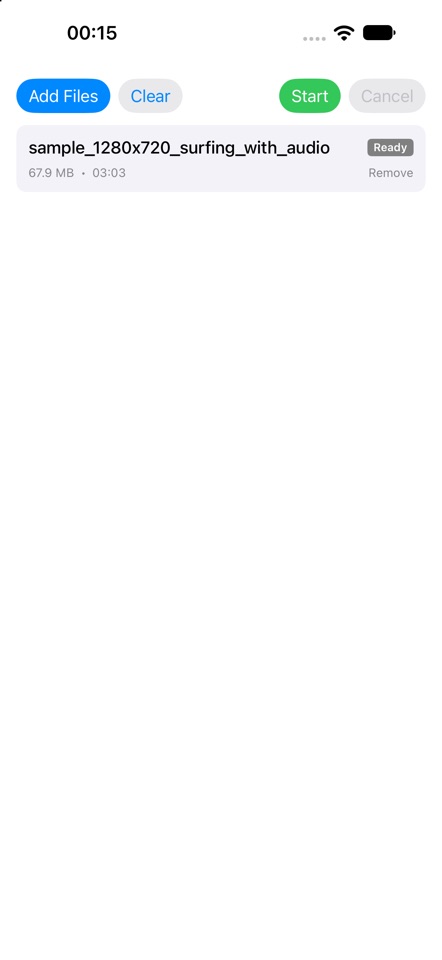
Apple devices are famously picky with media codecs. A video recorded on a camera, downloaded from the web, or saved on your PC often refuses to play natively on an iPhone or Apple TV.
Select a file format below to see how Apple devices treat it and how Orchard Converter instantly fixes it.
Apple Photos and QuickTime refuse .mkv files by default. If the video inside is H.264, Orchard copies the video stream directly without re-encoding, preserving 100% picture quality in mere seconds, converting the audio to native AAC.
Whether you prepare your media on your Windows 10/11 computer before copying over, or convert directly on your iPad, iPhone, and Mac on the go.
Convert on your PC so the finished file opens effortlessly on iPhone, iPad, Mac, and Apple TV. Perfect for downloading files, camcorder archives, or gaming clips on PC and making them Apple-ready in seconds.

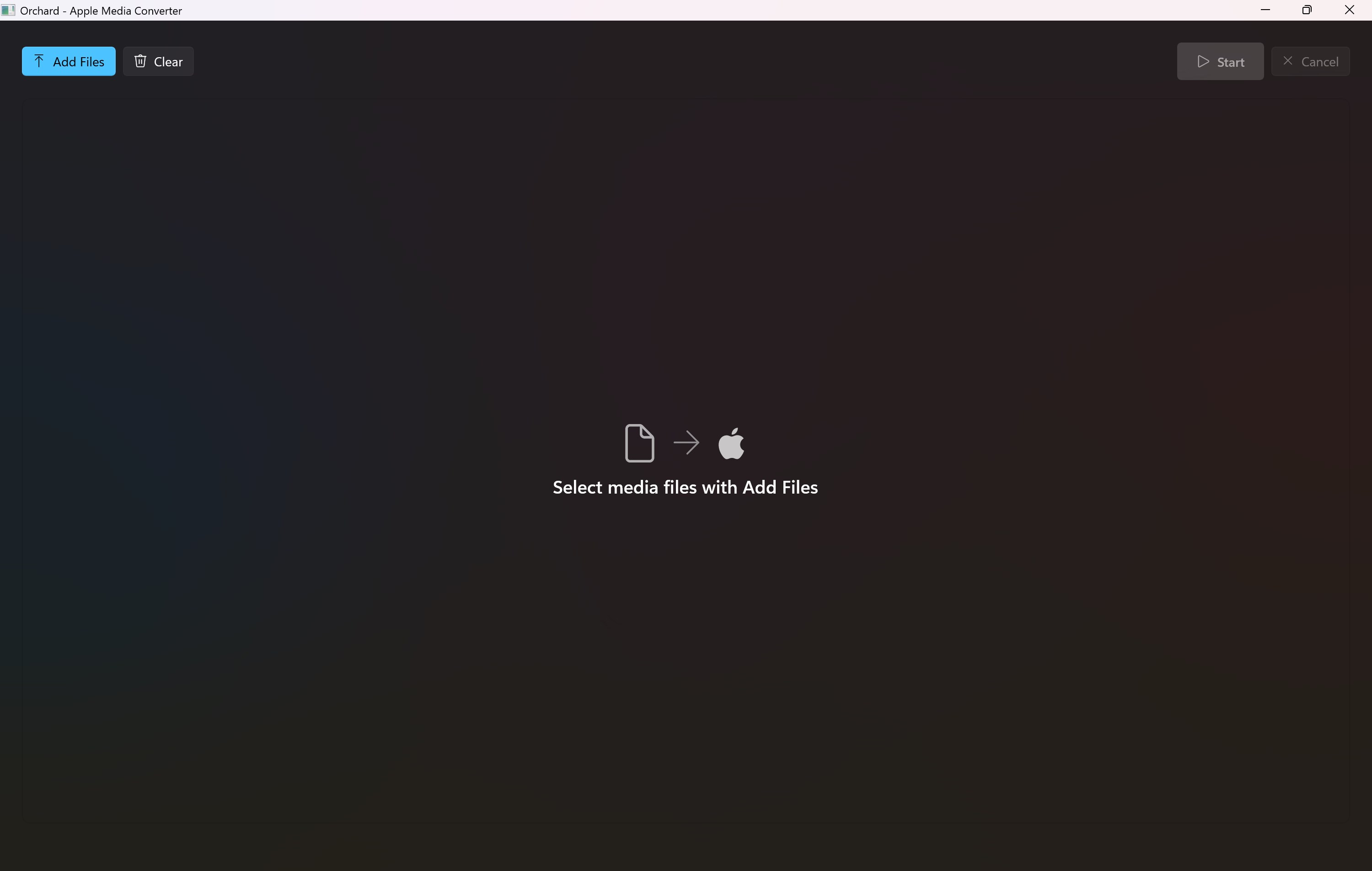
Orchard handles virtually any audio or video container and turns it into standard, native Apple H.264 / HEVC / AAC.
Movie, anime, and TV show torrents are almost always packaged in .MKV containers with multi-channel DTS, AC3, or Opus audio. iOS, iPadOS, and Apple TV won’t open them natively. Orchard Converter bridges the gap in seconds without re-compressing.
Stop struggling with battery-draining third-party media players or waiting hours for slow re-encoders. Orchard uses intelligent stream pass-through.
Downloaded from BitTorrent or web indexers. Typically high-bitrate video wrapped in an unsupported container with non-Apple audio codecs.
Orchard extracts the untouched H.264/HEVC video stream and only transcodes incompatible audio to Apple AAC. Finishes in 5–15 seconds!
Opens natively in Apple Photos, QuickTime, and Apple TV. Ready for instant AirDrop to your iPad for offline flights.
Scene torrent releases (x264, x265, HEVC) already contain video streams Apple hardware loves. Orchard avoids re-compressing and simply changes the container from MKV to MP4. A 4GB film finishes in under 15 seconds with 100% original image quality.
Torrents often pack 5.1 DTS-HD, E-AC3, or Opus soundtracks that play in complete silence inside iOS Photos and QuickTime. Orchard isolates the audio and converts it into compliant Apple AAC while leaving the video completely untouched.
Downloaded a complete 10-episode TV season or a film franchise? Drag and drop the entire torrent download folder into Orchard on Windows or iPad. It automatically queues every episode and converts them in bulk while you relax.
Heading on a flight or road trip? Convert your torrent downloads on your PC or Mac, AirDrop them straight to your iPhone or iPad, and store them directly in the Apple TV or Photos app. Zero Wi-Fi required, using native hardware decoders for maximum battery life.
Apple TV (tvOS) requires strictly compliant MP4/M4V containers to stream through AirPlay and Apple Home Sharing. Orchard eliminates buffering, stuttering, and transcode crashes so your movies play smoothly in your home theater.
Torrent movie files are often 2GB to 25GB—way beyond the tiny caps of free web converter sites that make you upload your files. Orchard processes everything 100% locally on your computer or iPad. Your downloads stay completely private.
See how everyday creators, families, and professionals rely on Orchard Converter to keep their media flowing.
"I had hundreds of MKV vacation videos recorded over 5 years. Trying to get them into Apple Photos on my Mac and iPad was always a nightmare. Orchard converted the whole archive in batch, and because it smart-remuxed without re-encoding, it took minutes instead of days!"
"I use a powerful Windows gaming rig for downloads and editing, but my phone and tablet are iPhone and iPad. Orchard is the fastest bridge I’ve ever found. One click and my files are ready for AirDrop and Apple TV."
"Finally, an app without 50 complicated bitrate sliders and bloated settings! Choose file, convert, done. No cloud upload needed, so I know my family videos are completely safe and private."
"Orchard paired with OneFlix is an absolute dream setup for Apple TV. I convert full 4K movie downloads in seconds, drop them in OneDrive, and stream in my living room with zero buffering and no server setup."

No artificial bloat, no subscription traps, and zero third-party cloud data harvesting. Orchard Converter is designed to feel wholesome, fast, and completely natural on your devices — ready whenever inspiration strikes.
No confusing bitrates, no codec menus, no complex multi-page settings. Just choose your media and convert.
Drag and drop or pick your video or audio files from your camera, downloads, external drive, or Files app.
Pick Apple-optimized conversion, fast smart pass-through, or extract audio only for Apple Music.
Your new file is ready to open natively in Photos, AirDrop to contacts, stream to Apple TV, or play in QuickTime.
Built from the ground up to solve media playback hurdles with maximum speed and zero quality compromise.
When a video stream is already H.264 or HEVC, Orchard repackages the container without re-encoding. Conversion completes in seconds with zero loss of original image fidelity.
When a file contains unsupported codecs (DivX, VP9, WMV, FLV), Orchard automatically applies a full encoding pass targeted specifically to Apple specifications.
Want just the soundtrack, interview audio, or music from a video? Extract pristine Apple-compatible AAC or ALAC sound ready for Apple Music or podcasts in one click.
Convert dozens or hundreds of clips at once. Queue up home videos, TV shows, or vacation camera clips and let Orchard Converter process them smoothly in the background.
Never upload your precious memories to anonymous servers. Everything runs entirely on your local CPU and GPU. Fast, private, secure, and available without Wi-Fi.
Finished media fits right into your digital life. Open in Photos, sync with iCloud, edit in iMovie or Final Cut, or share seamlessly across Messages and AirDrop.

Don’t fill up your iPhone, iPad, or Apple TV with hundreds of gigabytes of media. Once Orchard Converter optimizes your videos into native Apple MP4/M4V, store them in the cloud and stream on-demand with enarmedia companion apps.
Stream your personal movie and TV show library directly from OneDrive to your Apple TV in 4K HDR. Subtitles, audio tracks, and resume playback supported out of the box.
View on Apple App StoreStream directly from ultra-affordable cloud object storage (iDrive® E2, Cloudflare R2, Wasabi, AWS S3) right onto your living room Apple TV without maintaining home servers.
Explore Enarmedia Cloud AppsSearch queries and everyday obstacles people solve with Orchard Converter every single day.
MKV containers stall when imported into Apple Photos or iCloud. Orchard repackages the H.264/HEVC stream into native MP4 in seconds, converting non-standard audio to AAC.
Fast Lossless RemuxDownload or record files on your Windows 10/11 PC, convert them in batch, and save directly to your USB drive, network share, or iCloud for immediate playback across iPad and Mac.
Windows to Apple BridgeApple TV requires strictly compliant MP4/M4V containers with compatible audio tracks. Convert video archives so they stream natively via AirPlay and Home Sharing.
Apple TV & AirPlay ReadyFiles containing AC3, E-AC3, DTS, or Opus audio tracks often play silently in iOS Photos and QuickTime. Orchard transcodes the audio to pristine Apple AAC while keeping the video untouched.
Audio Fix & AAC PassthroughFootage from Sony, Panasonic, or Canon camcorders is often saved in complex AVCHD structures. Orchard converts them into smooth, clean 60fps Apple MP4 clips ready for editing or viewing.
Camcorder & Camera ReadyDownloaded movie and TV torrents with MKV containers and 5.1 DTS/AC3 audio won't play in Apple Photos or AirDrop. Orchard remuxes video losslessly in seconds and fixes the audio track.
P2P & Torrent RemuxNeed just the concert sound, lecture audio, or podcast soundtrack? Strip away the video and generate Apple-compatible AAC/M4A sound files ready for your music library.
Audio ExtractionSave local phone and Apple TV storage by uploading converted MP4s to OneDrive or S3 cloud. Stream in 4K with Enarmedia's OneFlix and E2 Explorer players.
Cloud Streaming PlayerEverything you need to know about Orchard Converter on Windows and Apple devices.

No more stalled videos, missing audio, or third-party players. Download Orchard Converter today and enjoy seamless playback across all your devices.